

Overview
We use Laso Finance to build Laso Finance, and paid acquisition is one of those vectors. An autonomous PPC operator runs our advertising. It is paid on the incremental contribution margin it generates from new customers. The pay goes to its Laso wallet, gets loaded onto its own Laso reloadable card, and the card buys the next round of ads. The recipe works for any business that can tie revenue back to a customer. The agent earns only when the customers it acquires make money, so its budget grows only as fast as it finds profits. Parts of this loop run today, parts are switched off until they’re proven. What is live today is updated as each step is turned on.Tools Used
1. Set the objective and the pay
Give the agent one objective, in writing:Maximize incremental contribution margin generated by genuinely new users acquired through paid advertising.In simpler terms, “earn more and spend those funds via advertising”. Then pay it that number. Our agent is allocated 100% of the attributable contribution margin generated by the new users it acquires:
2. Measure all the way to money
Most PPC setups stop here: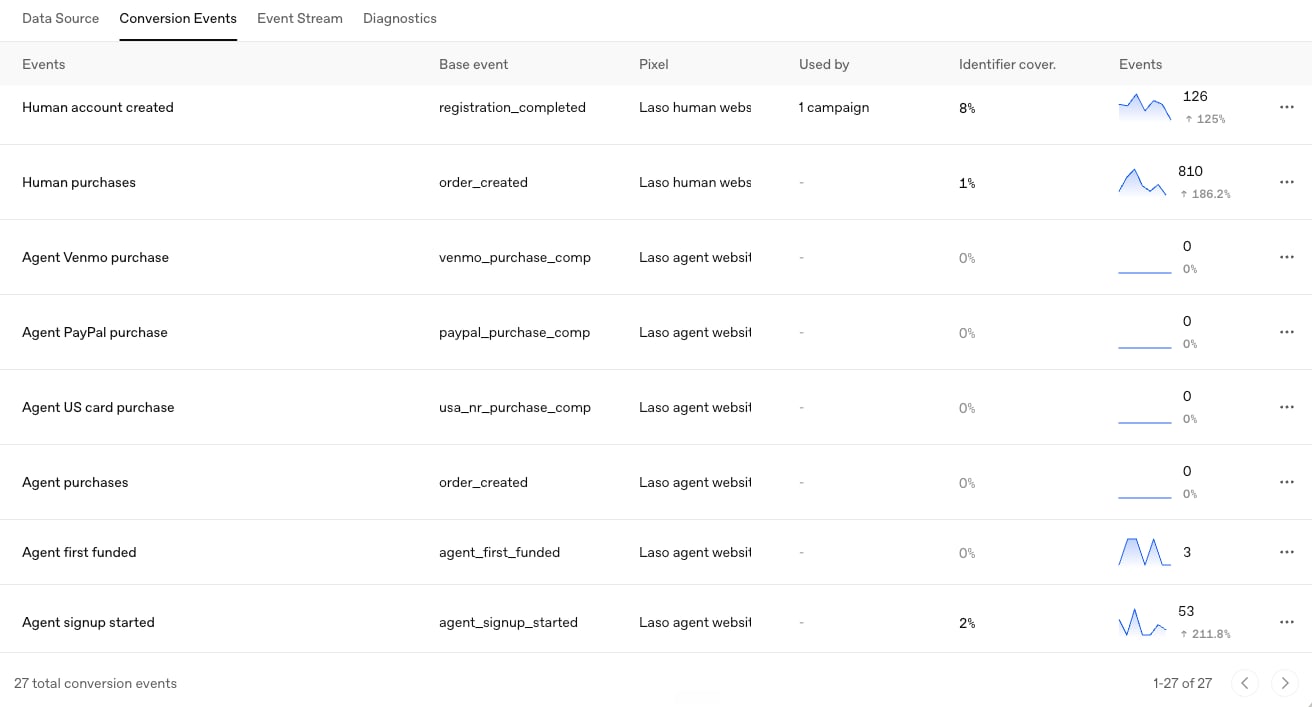
Conversion events in OpenAI Ads Manager, one per product and funnel step, split across a human pixel and an agent pixel.
- New users only. We capture the click ID and UTMs on landing, and only credit the agent operator from its own campaigns.
- Attribution is permanent. Once an account is credited to a campaign, later transactions are credited to the campaign, funding the agent.
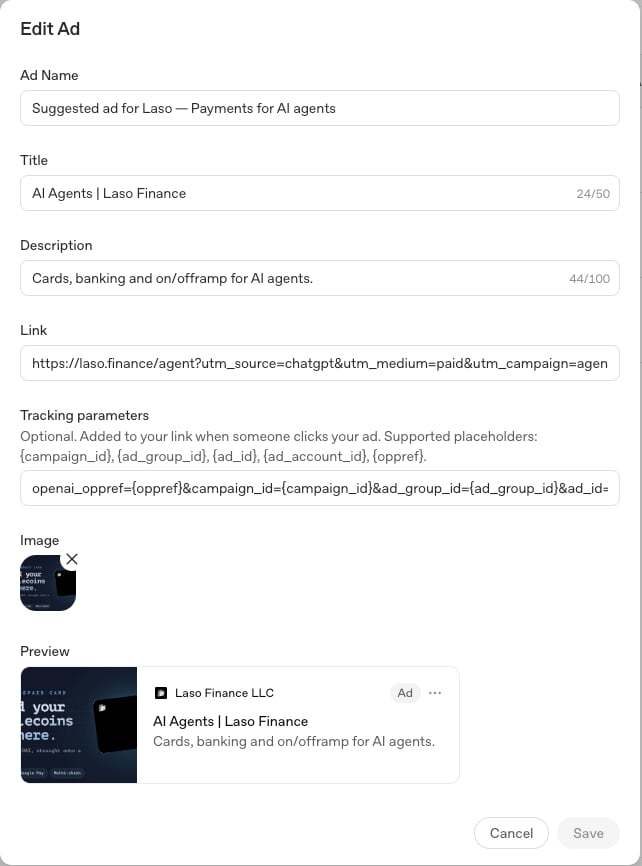
The openai_oppref template in an ad's tracking parameters.
3. Pay only for settled margin
Keep a ledger of what the agent has earned, and follow three rules:Settle before paying
Never pay for a click, a signup or a pending order. Only pay once the revenue has been recognized, and the variable costs can be applied to the transaction
Charge for the variable costs
Refunds and chargebacks append a negative row instead of rewriting the
original. If the original was already paid, the negative row offsets future
earnings.
Make payouts idempotent
Each payout covers an explicit list of ledger rows, and is confirmed against
a specific, unique transaction ID.
4. Give the agent its own wallet and card
Now, Laso provides value to the process. The agent holds its capital the same way the agent in automated payroll does.Create a managed wallet
Create a managed agent wallet to receive the
agent’s payouts, and set a spend limit
on it.
Create a reloadable card
Create a reloadable card and add it
as the payment method on each ad platform.
Top up for near-term spend
When a payout lands, the agent tops up the
card from the wallet with
GET /fund-card-balance.5. Run it daily, with memory in git
Our agent lives in a ChatGPT Project, but you can set this up with other harnesses such as Claude Code or Hermes. It runs the following steps once a day:- Read its charter and state.
- Pull the ad and conversion data through through the ChatGPT Ads Manager plugin
- Decides on next course of action to improve conversions.
- Sends a report of the current status and next actions.
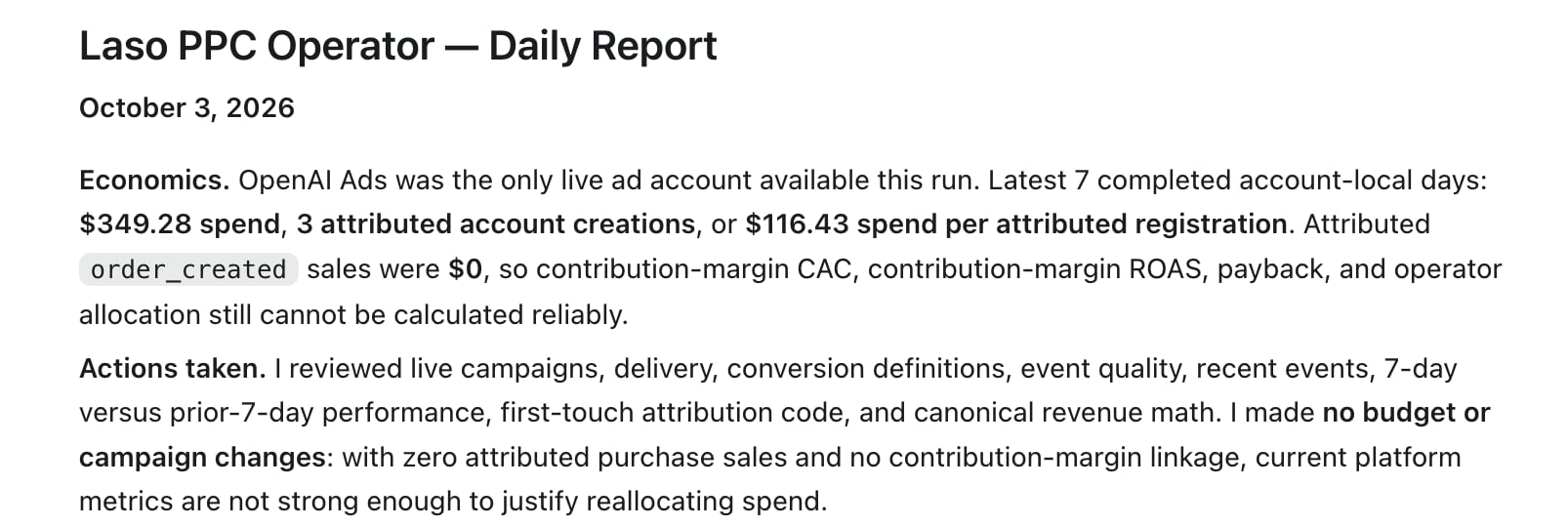
An excerpt from one day's report. With no attributed sales, the agent left budgets alone.
- A charter (objective, pay, attribution rules, duties)
- A state file (verified facts, experiments, failed hypotheses, lessons).
What is live today
Build this yourself
First, install the ChatGPT Ads Manager plugin into your ChatGPT agent.Quickstart
Then, run the following prompt:Setup the agentic PPC operator for my company.
Setup
For a more intentional setup, use the following Laso tools in addition to the ChatGPT Ads Manager plugin.Managed agent wallet
Give your agent a wallet to hold its own capital.
Reloadable cards
Give it a card it can pay ad platforms and vendors with.
Spend limits
Cap what the wallet can spend.
MCP server
Connect your own agent to Laso.